

Flash offer: 15% off Voga closet
How do I withdraw money from my account?
You’ll be able to withdraw money from any Arab Bank ATM covering the kingdom. Follow these steps:
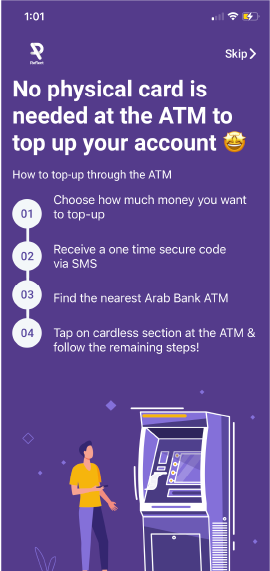
And here are the steps....
Step 1
Tap on the card icon found on the dashboard
Step 2
Click on the 'ATM Withdrawal' option
Step 3
Choose the amount you would like to withdrawal
Step 4
You will receive a one time secure code via SMS
Step 5
Find the nearest Arab Bank ATM
Step 6
Tap on the contactless section at the ATM
Step 7
Select Reflect, enter your mobile number, then enter code via SMS and the amount you want to withdraw